Split kid expenses with your co-parent.Fairly, and on the record.
Log what you paid for the kids. Your co-parent approves it, or says why not. Then settle up by PayPal, Revolut, bank transfer or QR code. Free for both of you, and one Premium purchase covers the whole family.
ReimburseKid is an iPhone app for separated parents: one parent logs a shared child expense, the other approves or disputes it, and you settle up by bank transfer, QR code, PayPal or Revolut, with a sealed PDF record whenever you need one.
Why do shared kid costs turn into arguments?
Because the record lives in three places: a chat full of receipt photos, a banking app, and two memories. Nobody agreed to a cost before it was paid, nobody is sure what was paid back, and the parent who fronts the money ends up chasing. ReimburseKid gives both parents one list, and nothing counts until both agree.
Before: Receipts buried in a chat thread
After: One shared list, per child, with the receipt on the expense
Before: “I never agreed to that.”
After: Nothing counts until the other parent approves it
Before: “Did you ever pay me back?”
After: Paid, confirmed, settled: both of you see the same status
Before: Chasing, every month
After: Reminders that go out on their own and stop when things move
Before: An app each parent has to pay for
After: Free for both, and one Premium purchase covers you both
How does ReimburseKid work?
One parent creates the family and shares an 8-character invite code. After that, every shared cost follows the same four steps: log it, agree on it, pay it, confirm it. Both parents see every step, and every step is written to the family’s activity log.
AMYou
Emma & Noah
Expenses
AMJM
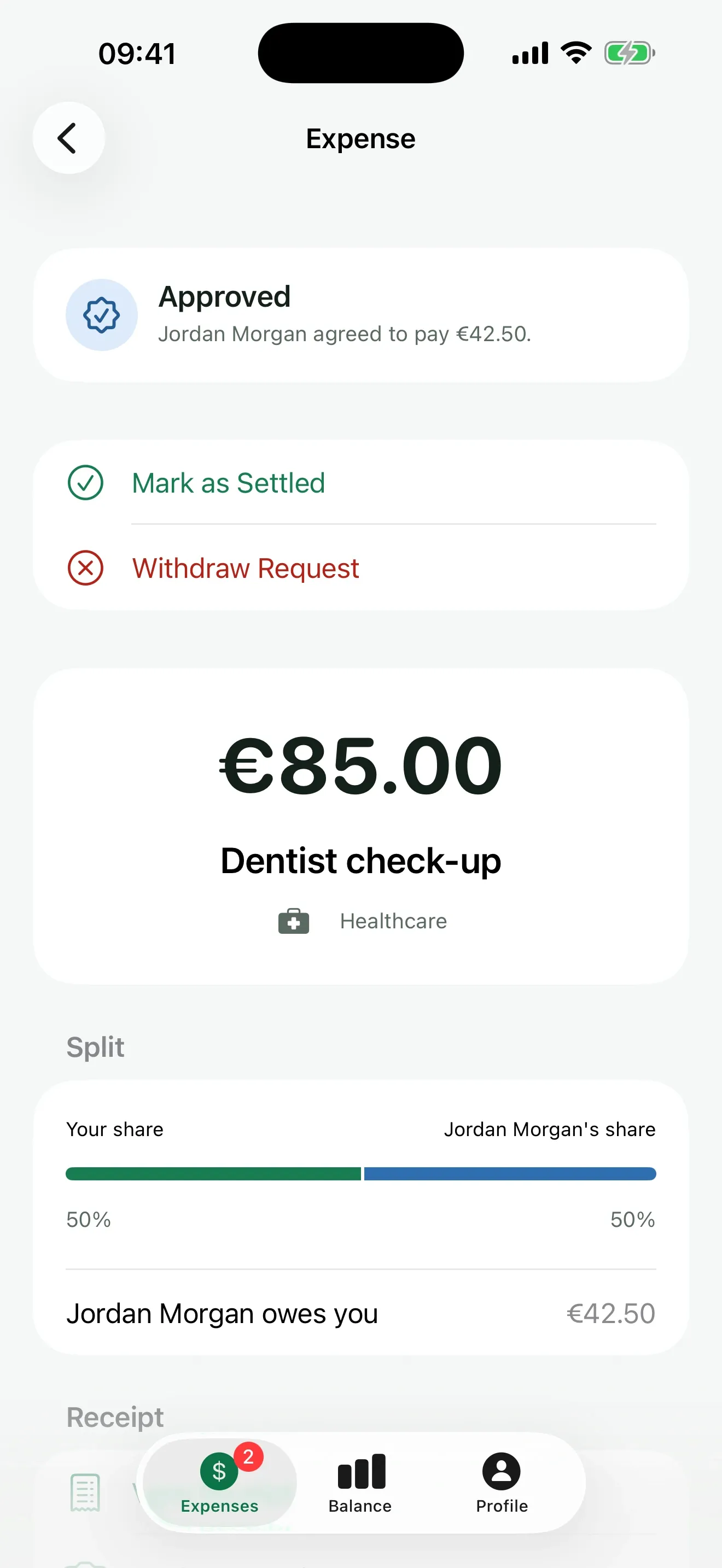
Dentist check-up€85.00
Healthcare · 26 Sep · Emma
PendingApprovedPayment sentSettledYou paid · 50%
Soccer club fees€120.00
Activities · 29 Sep · Noah
PendingJordan paid · 50%
School trip€45.00
Education · 28 Sep · Emma
PendingYou paid · 50%
Winter coats€140.00
Clothing · 20 Sep · Emma, Noah
SettledJordan paid · 50%
Summer camp deposit€350.00
Activities · 18 Sep · Noah
Payment sentYou paid · 50%
ReimburseKid
Jordan’s share€42.50
Pending
Logged by Alex · paid by Alex
Approved
Approved by Jordan
Payment sent
Jordan paid €42.50 with PayPal
Settled
Alex confirmed it arrived
RefRK-3C91D0
JMJordan
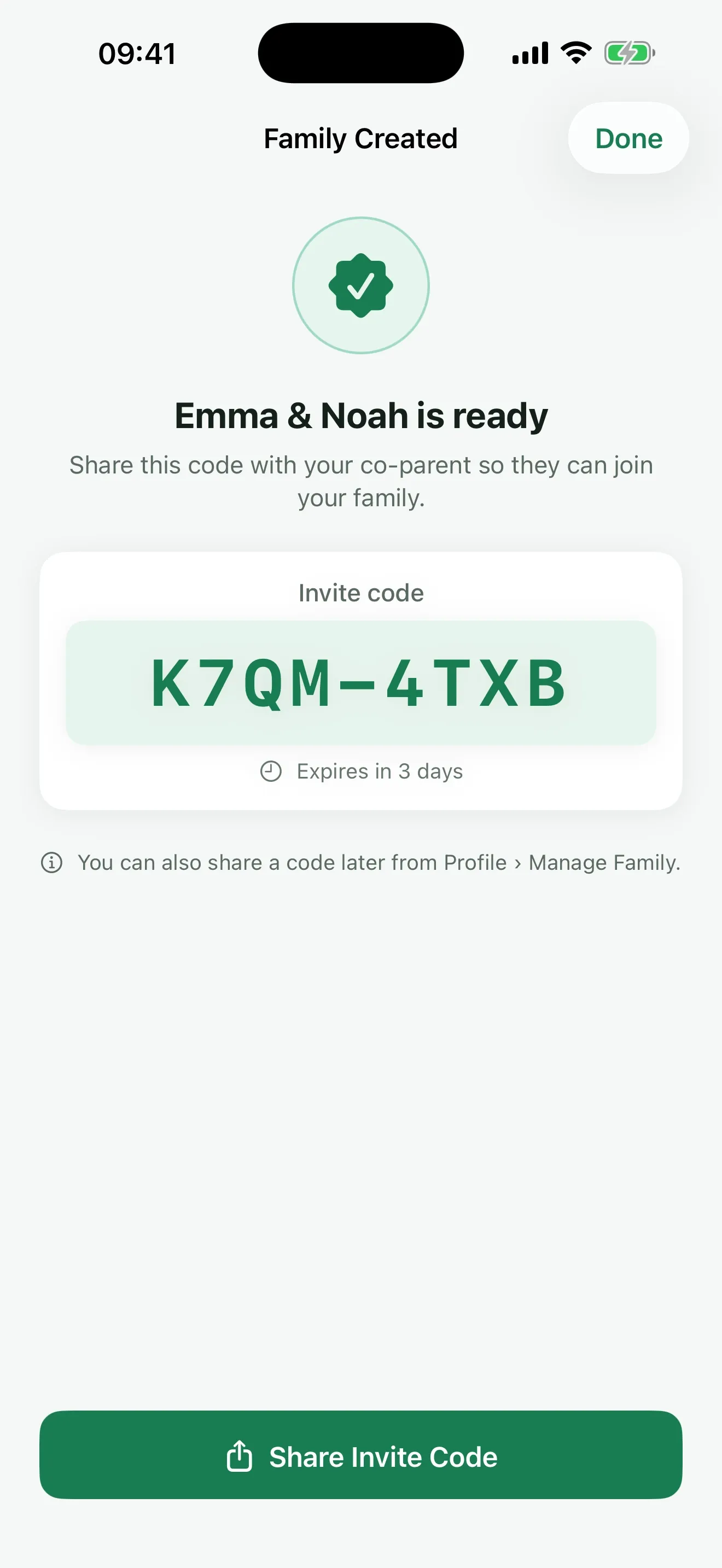
Start with an invite code
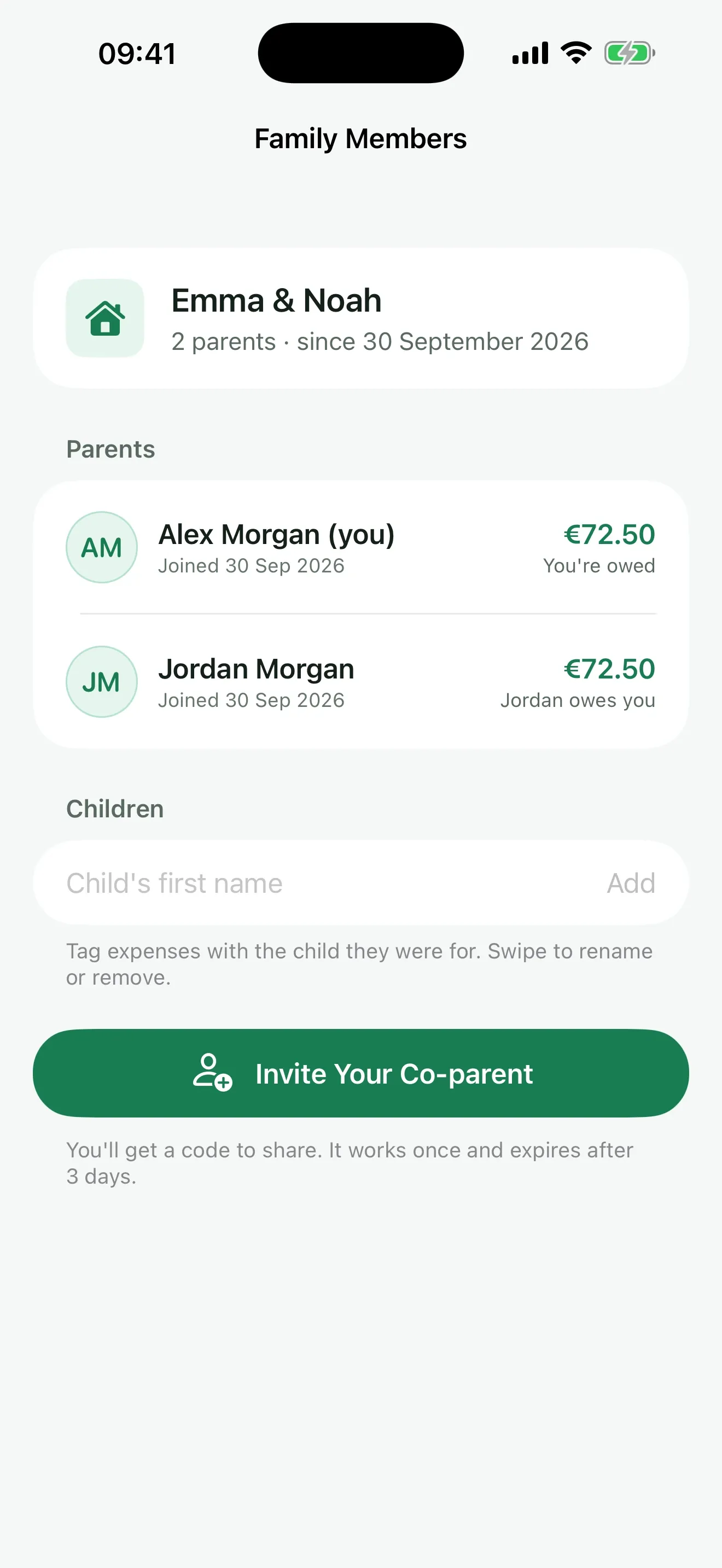
Create your family, pick your currency, and share the code with your co-parent. It works once and expires after 3 days.
01
Step 01: Log it
Enter the amount, pick the child and the category, say who paid, and choose the split: 50/50, all on one parent, or any percentage. Add a receipt photo if you like.
02
Step 02: Your co-parent approves it
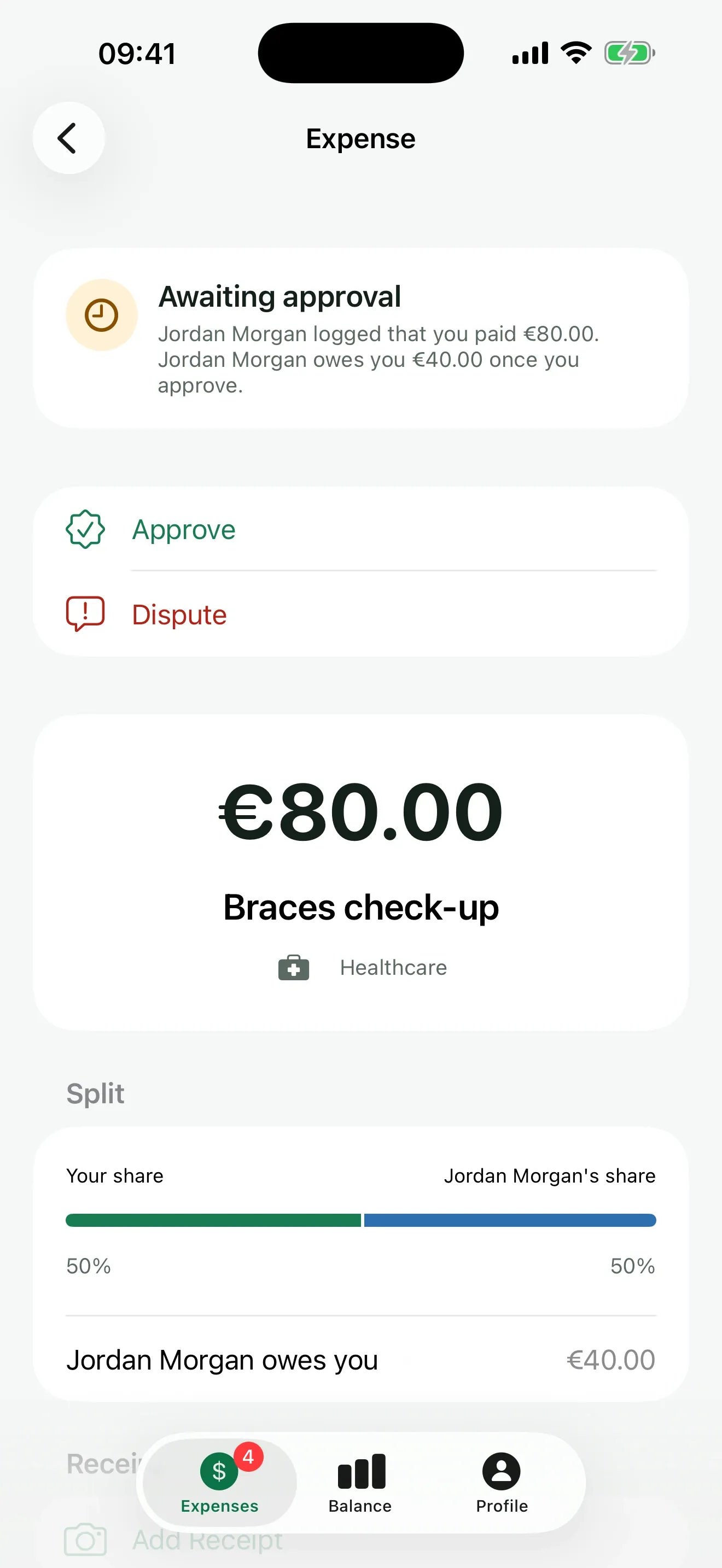
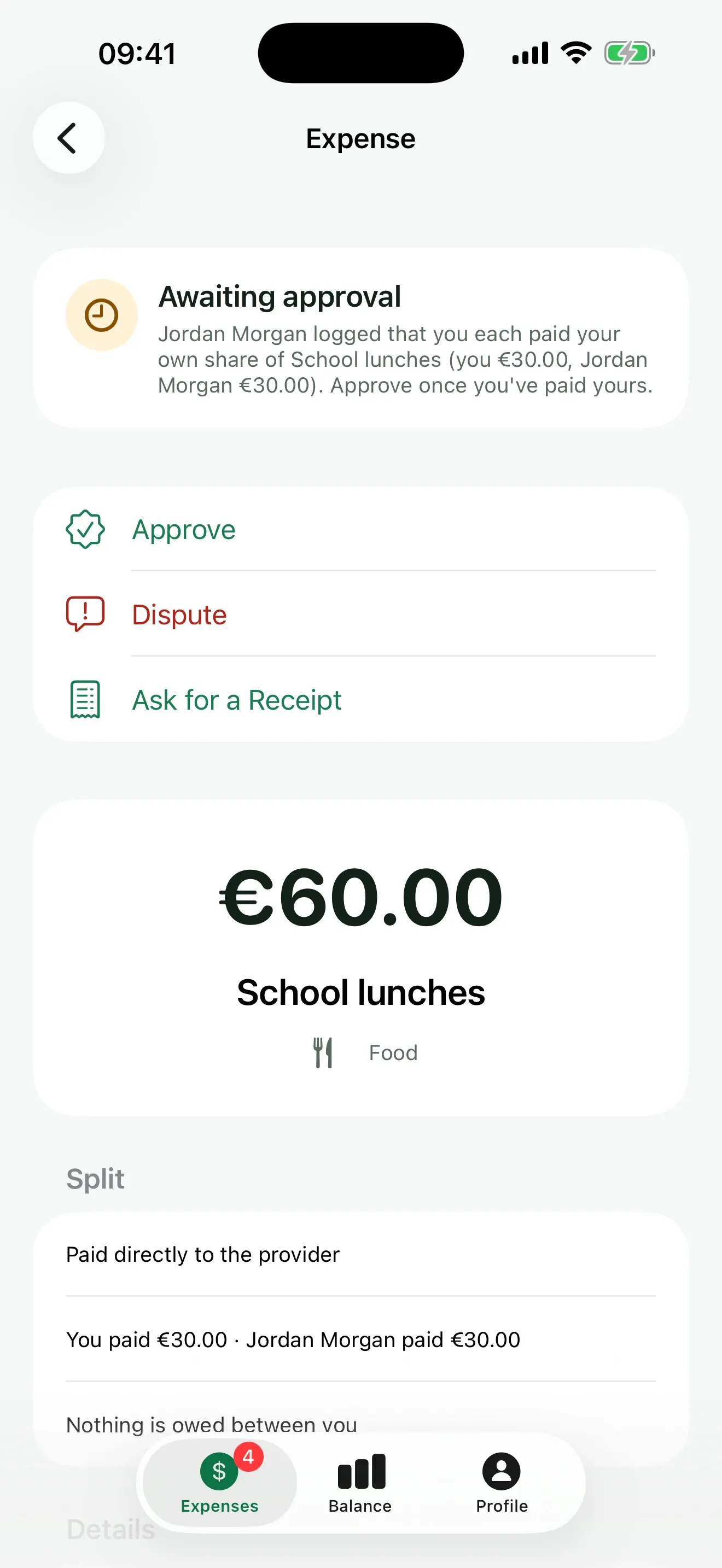
They get a notification and approve it, dispute it with a reason, or ask for the receipt. Only approved expenses count toward the balance.
03
Step 03: Pay in one tap
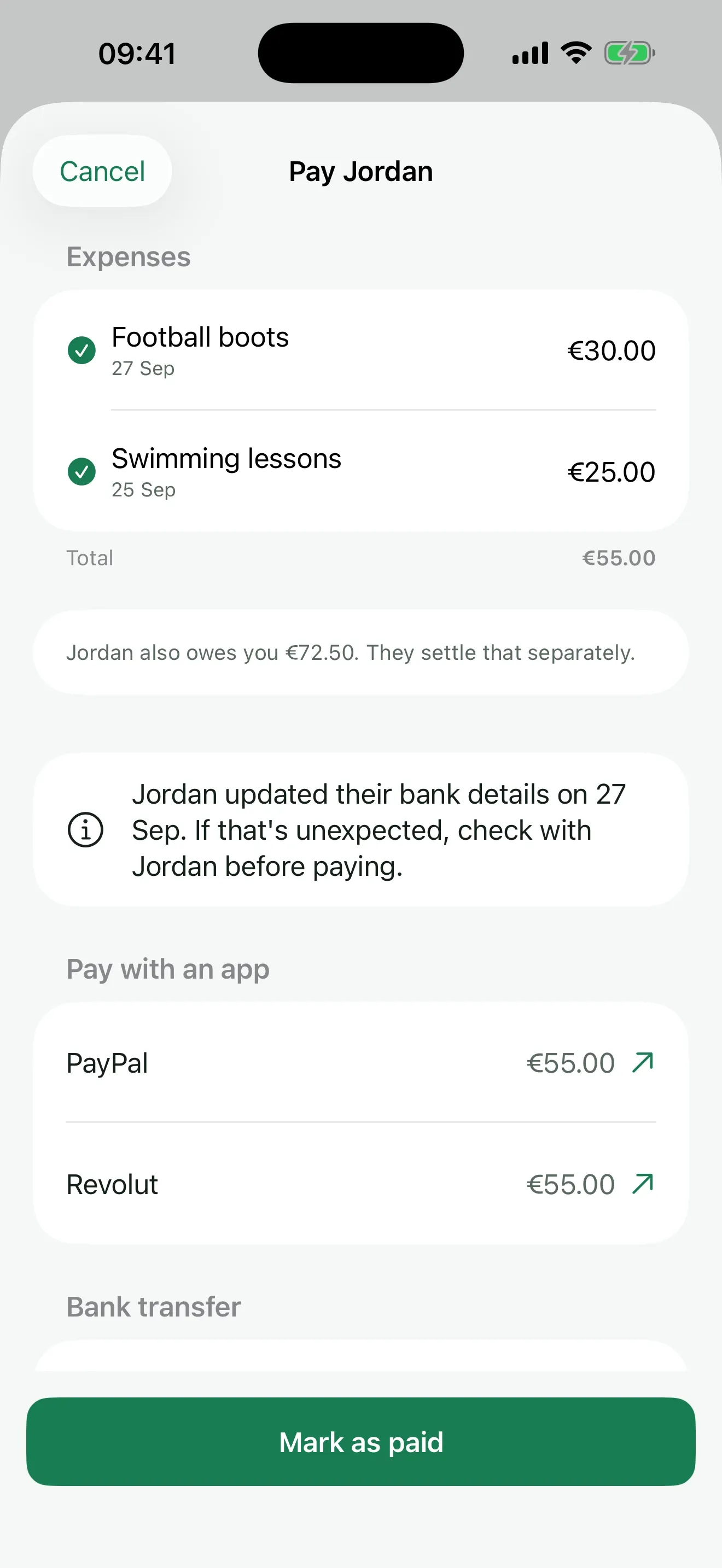
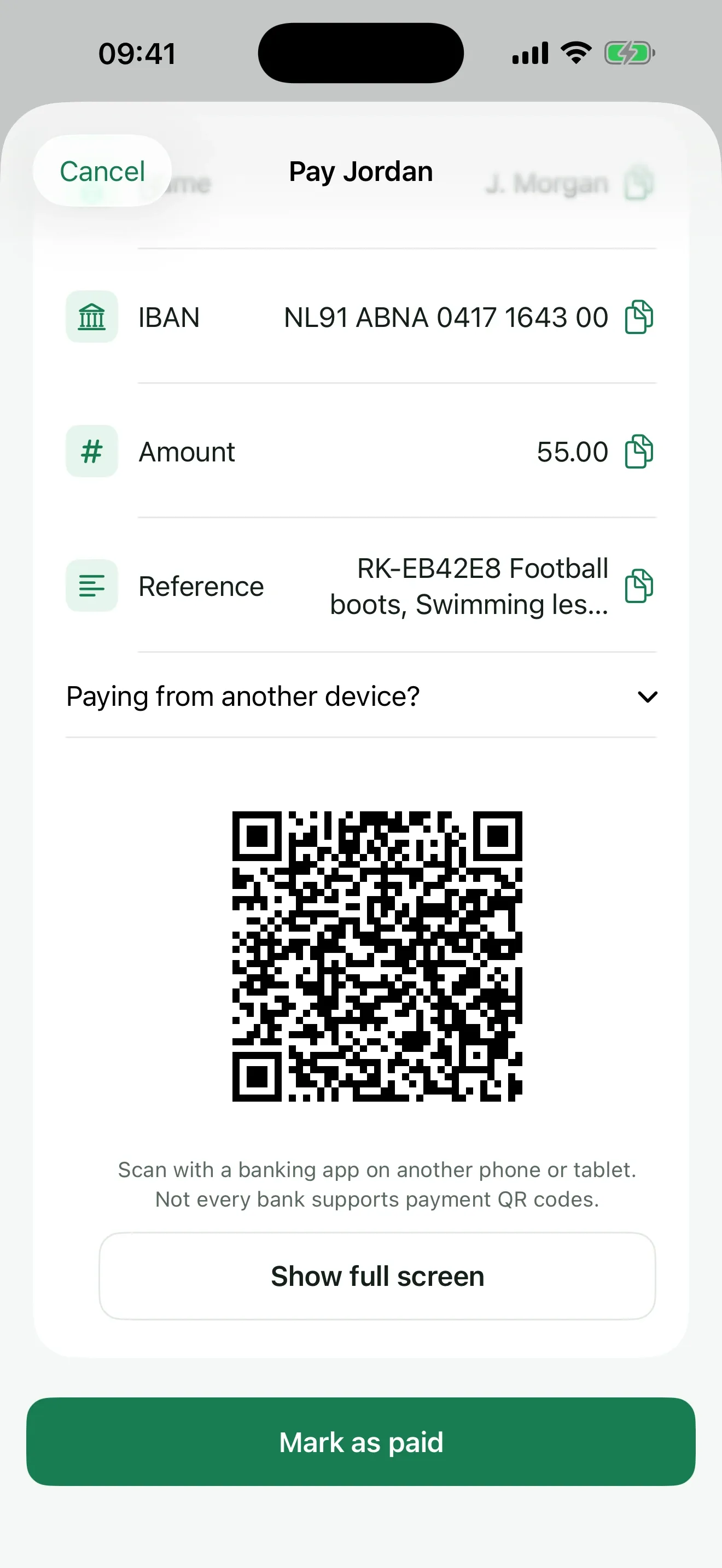
The parent who owes taps Pay. ReimburseKid opens PayPal or Revolut with the amount ready, or shows the IBAN, amount and reference to copy, or a QR code a banking app can scan.
04
Step 04: Confirmed and settled
Back from the payment app, one tap marks it paid. The other parent confirms it arrived, and the expense is settled. The activity log keeps who did what, and when.
What can you do with ReimburseKid?
Keep one shared list of the children’s costs, agree on each one, see a balance you both accepted, and pay it back without chasing. Premium adds recurring costs, receipt photos, insights and a sealed PDF report.
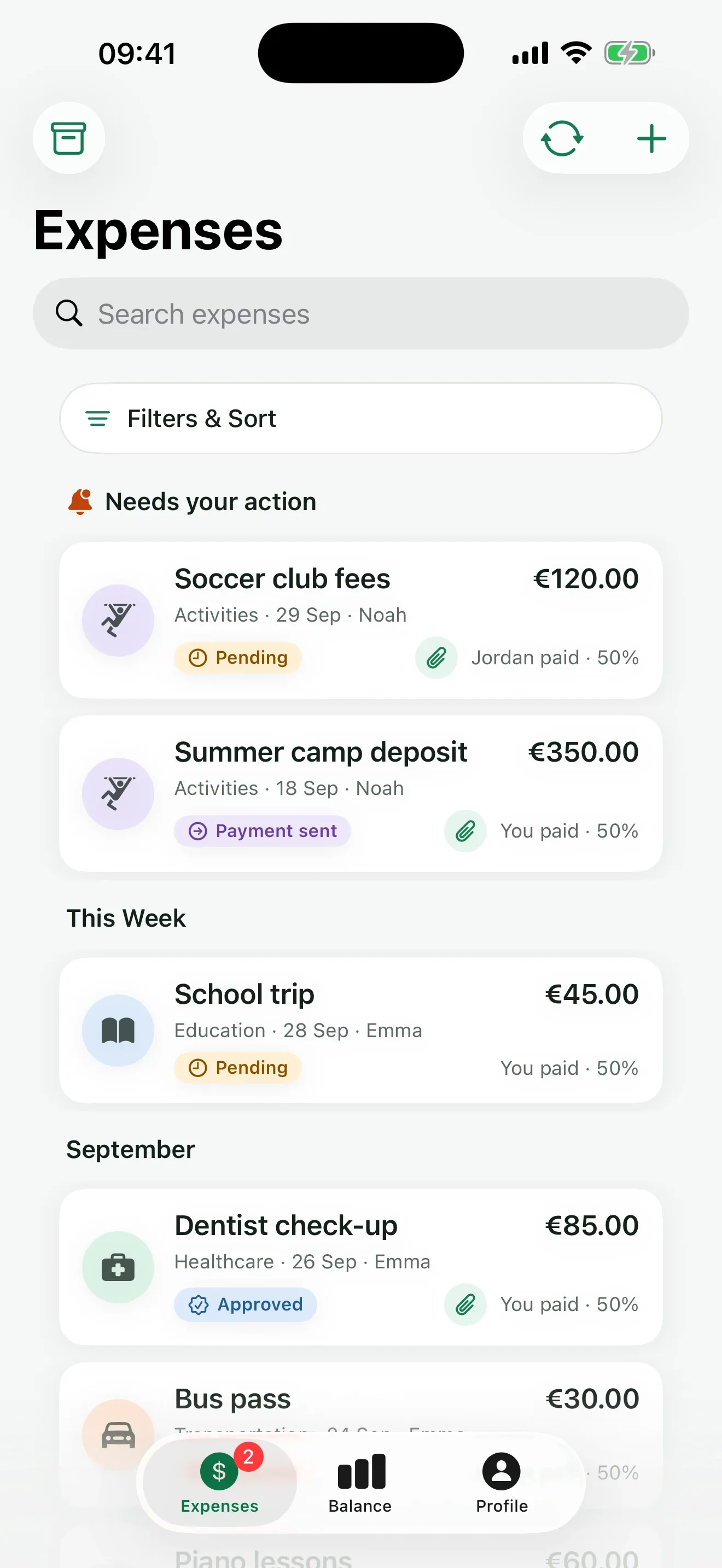
Every shared cost in one list
Expenses are grouped by what needs you first. Each one shows the child, the category, who paid and the split, with a colour for its status: pending, approved, disputed, payment sent or settled.
A balance you both agreed to
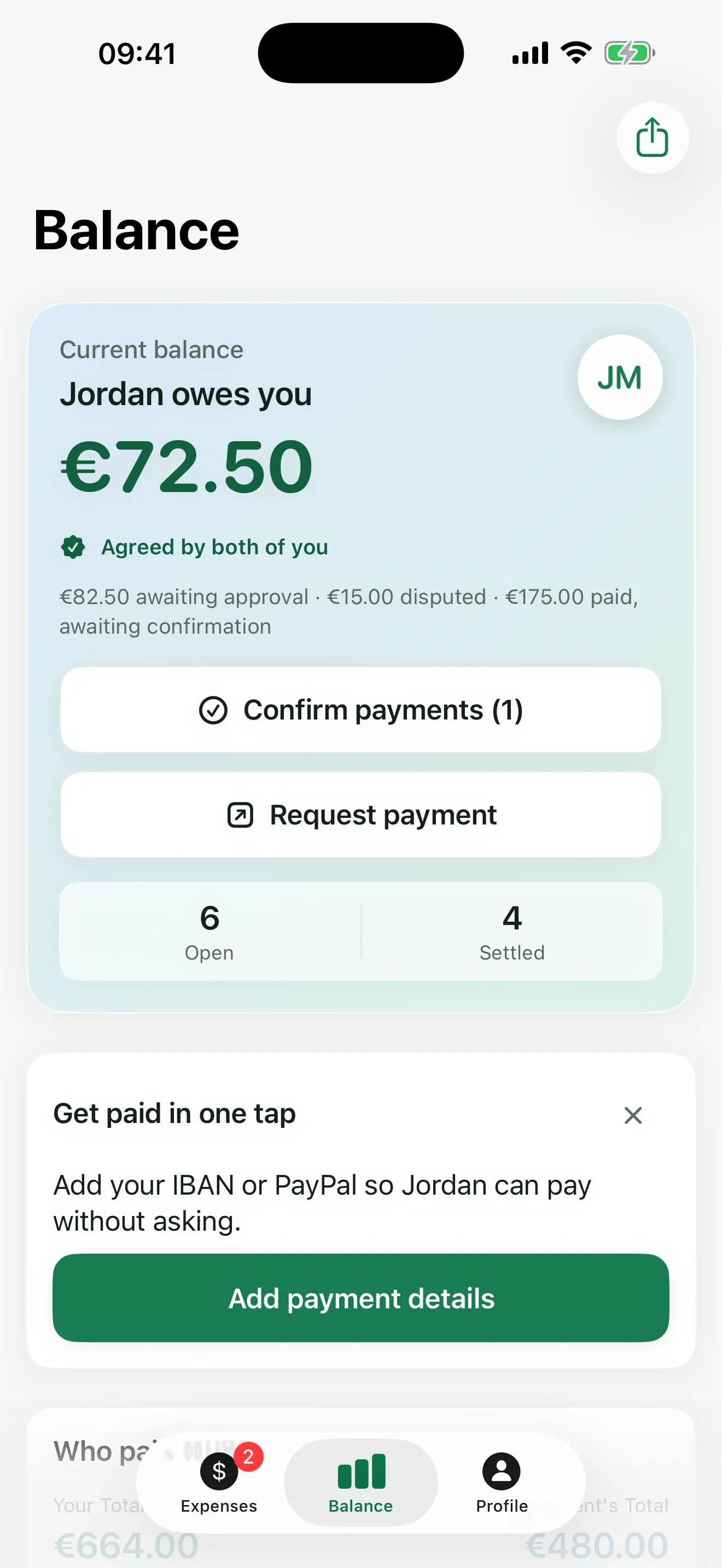
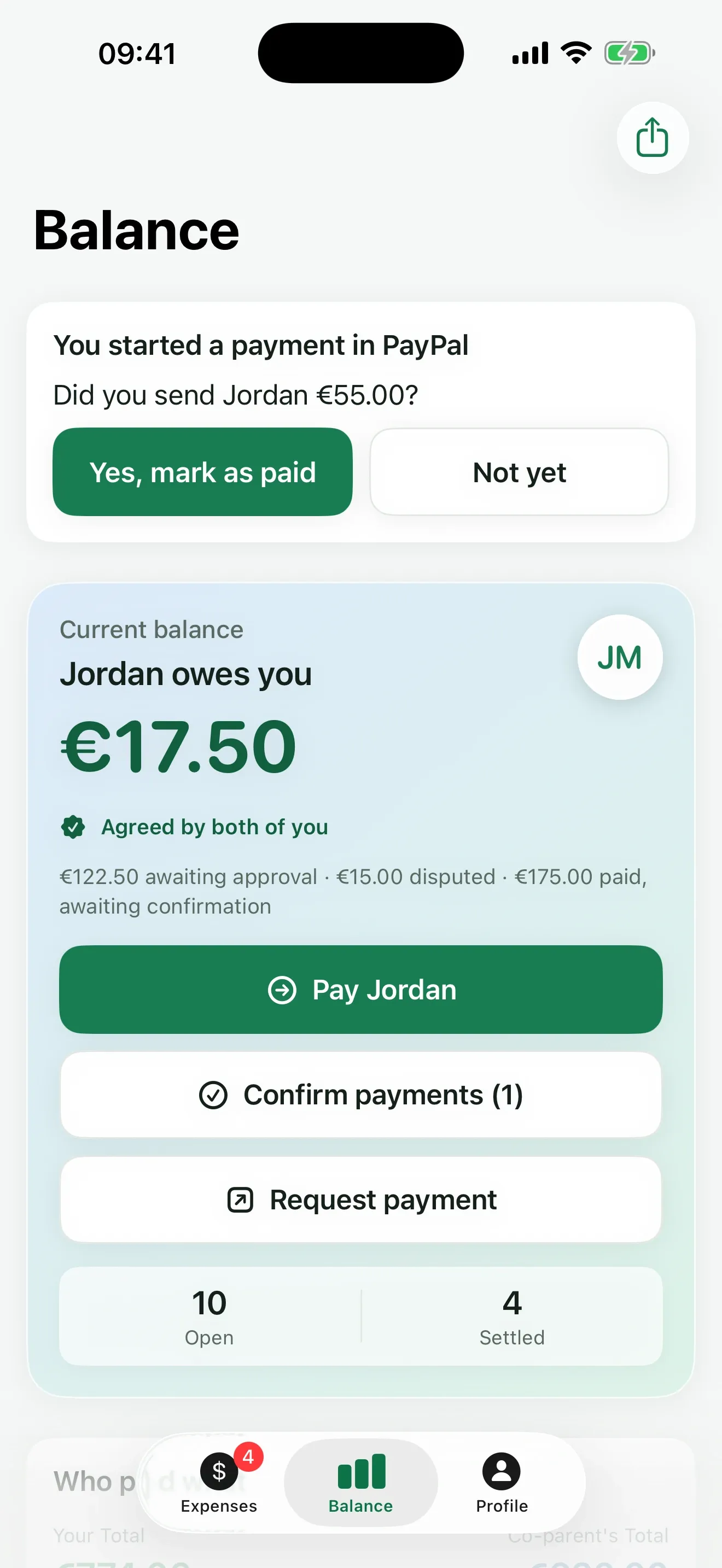
The balance counts approved expenses only. What’s waiting, disputed or paid-but-not-confirmed is shown beside it, so the big number is one you both said yes to.
Recorded the way it happened
You paid, your co-parent paid, or you each paid your own share straight to the school. ReimburseKid records it that way, and the other parent still confirms it.
Reminders that don’t nag
If an expense waits on the other parent, ReimburseKid reminds them after 3, 7 and 14 days, never more than once a day and only in the daytime. Disputed expenses never get reminders.
Scan the receipt, skip the typing
Point your iPhone at a receipt and ReimburseKid fills in the amount, the date and the shop, marked so you check them before saving. The receipt is read on your iPhone. Scanning is free; keeping the photo with the expense is Premium.
Works without a signal
Your expenses stay readable offline. New ones wait safely on your iPhone and send themselves as soon as you’re back online.
Larger text, VoiceOver and Dutch
Every screen works with the largest text sizes, Increase Contrast and VoiceOver. The app, its notifications and the PDF report come in English and Dutch.
Per child, not just per family
Tag each expense with one or more children, so it’s always clear who a cost was for. Premium reports total every child separately.
Recurring costs, set up once Premium
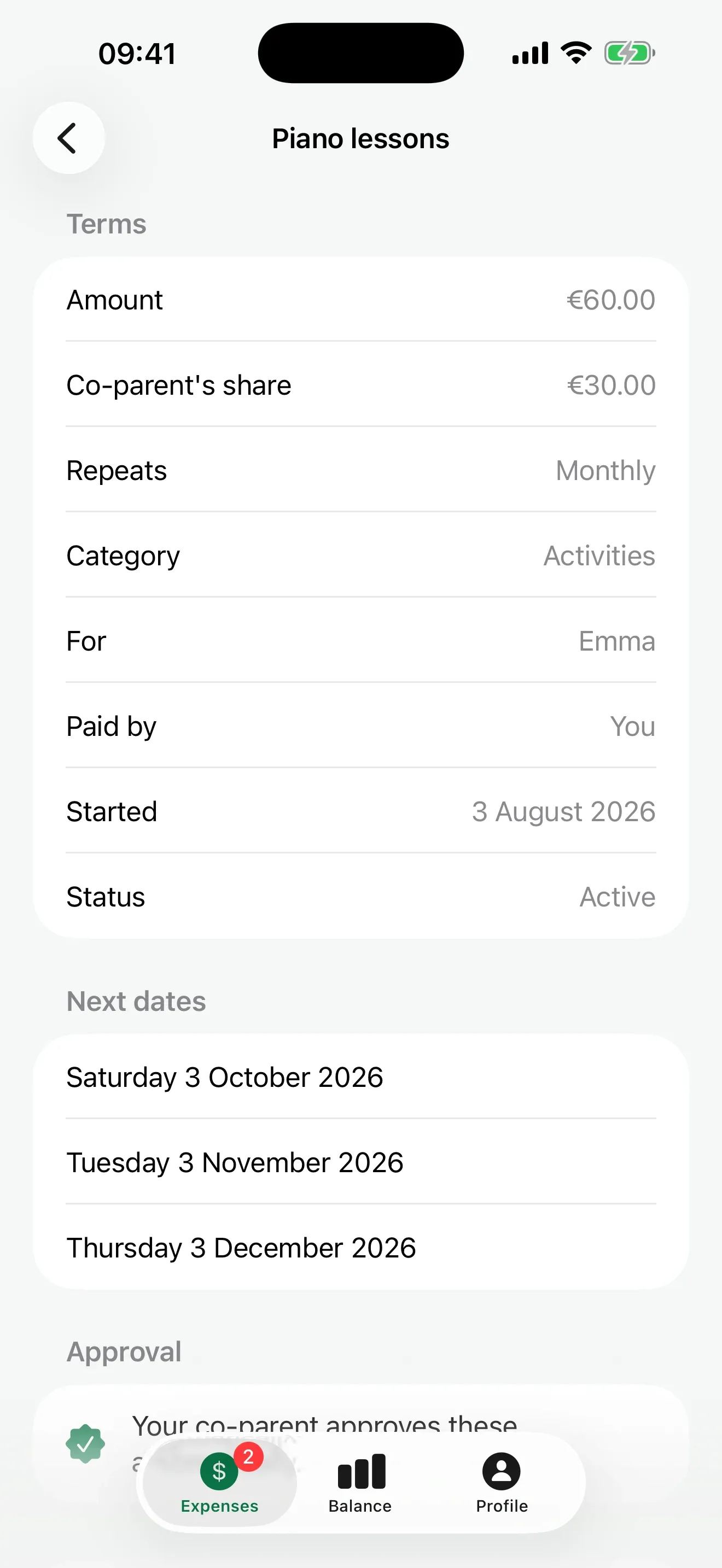
Piano lessons every month? Your co-parent approves the series once, and each month’s expense appears on its own, already agreed.
Receipts where they belong Premium
Attach the photo to the expense itself. Receipts are stored privately and open through links that expire after 60 minutes.
Insights and CSV export Premium
See where the money goes by category, filter by month, category and status, and export to CSV for an accountant or a mediator.
How do you pay your co-parent back?
In your own banking or payment app. Tap Pay and ReimburseKid opens PayPal with the amount filled in, opens Revolut, or gives you the IBAN, amount and reference to copy. Paying from another device? Scan the SEPA QR code. ReimburseKid never moves money: it goes straight from one parent to the other.
PayPalOpens PayPal.me with the amount filled in.
RevolutOpens Revolut.me; the amount is ready to paste.
Bank transferTap to copy the name, IBAN, amount and reference.
SEPA QR codeAn EPC QR code a banking app on another device can scan. Euro only.
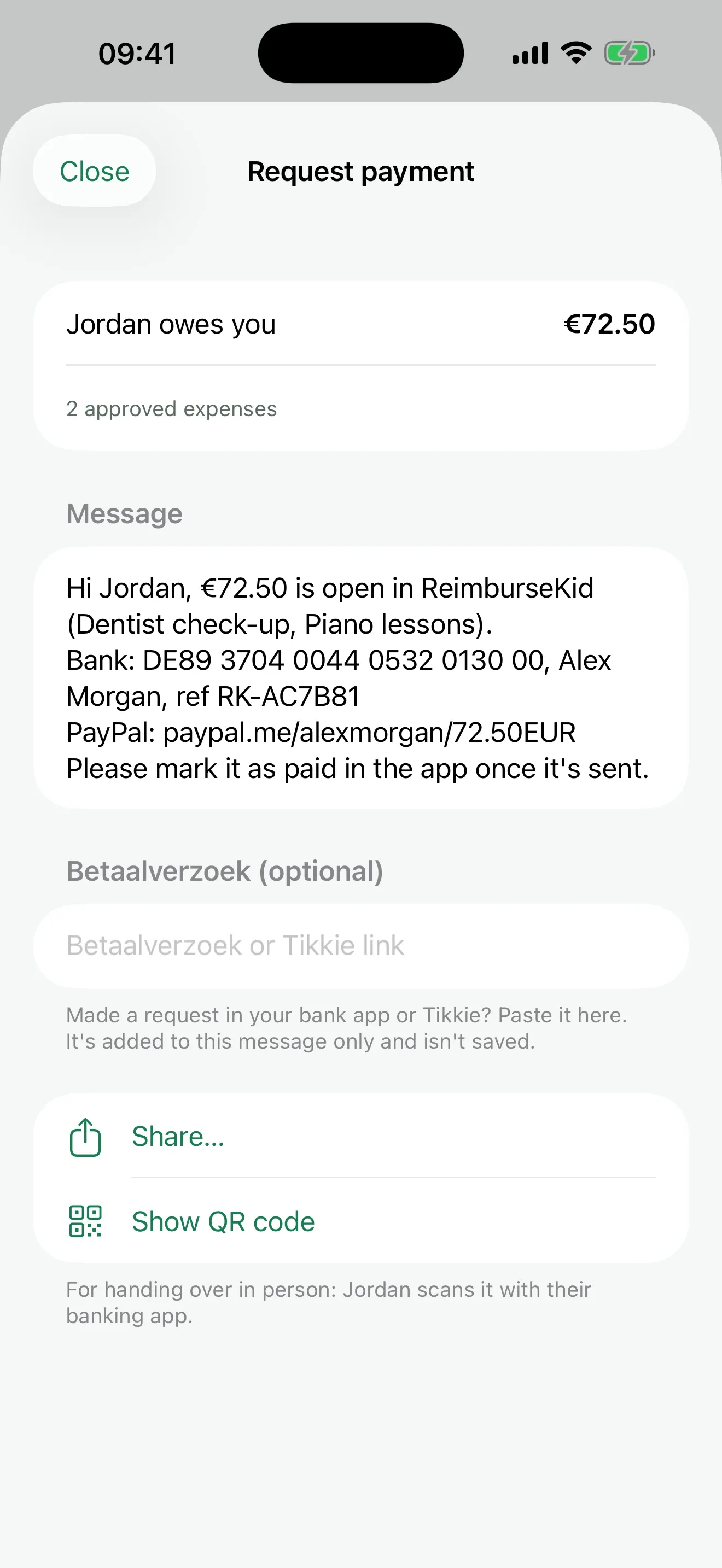
Betaalverzoek or TikkiePaste a payment request from your own bank app into the message you send.
CancelPay Jordan
Expenses
Football boots27 Sep€30.00
Swimming lessons25 Sep€25.00
Total€55.00
Pay with an app
PayPal€55.00 ↗
Revolut€55.00 ↗
Bank transfer
IBANNL91 ABNA 0417 1643 00
ReferenceRK-EB42E8
Mark as paid
PayPal
Revolut
Bank transfer
SEPA QR code
Betaalverzoek or Tikkie
Details only your co-parent sees
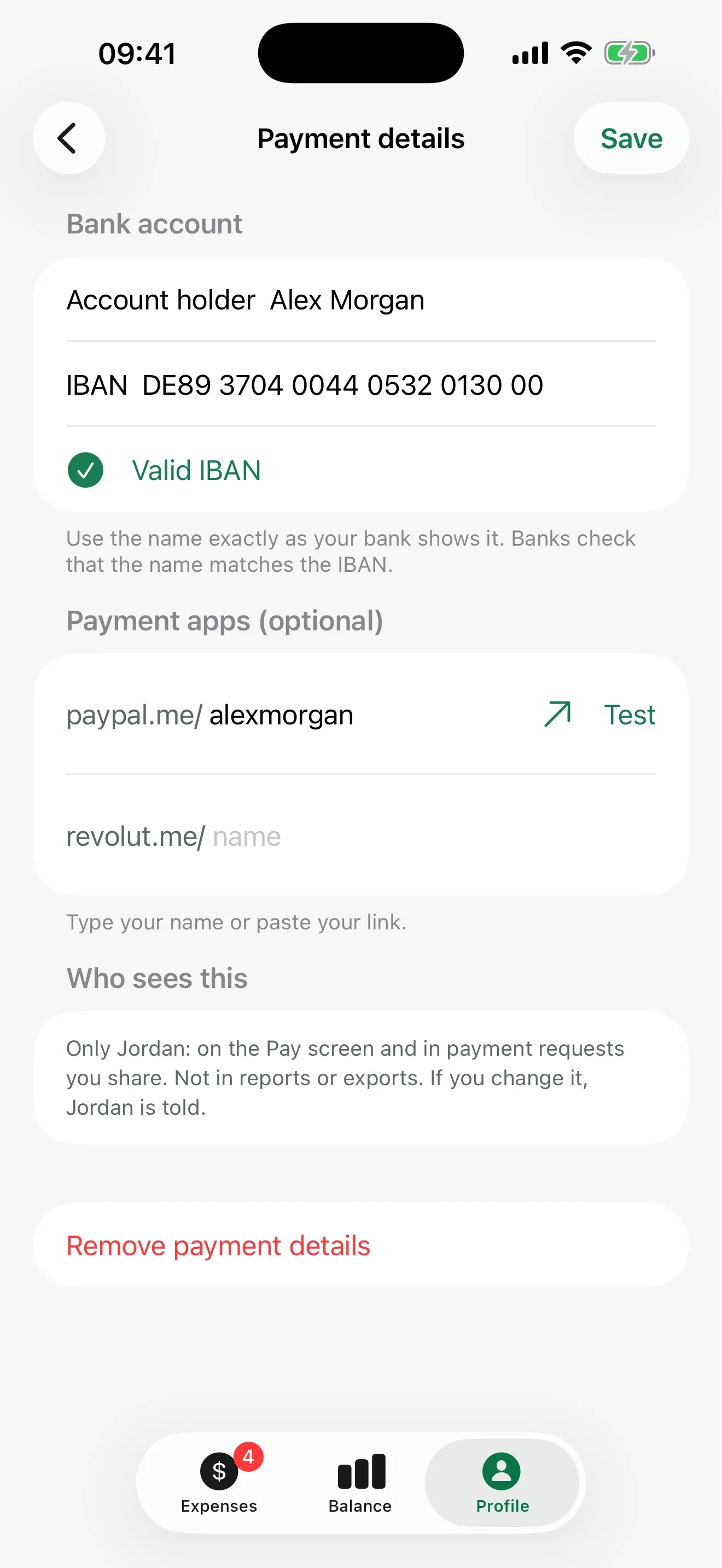
Each parent adds an IBAN, a PayPal.me name or a Revolut username once. Only the other parent can see them, and every change is announced to them, so a swapped IBAN never goes unnoticed.
A reference on every payment
Every bank payment carries a reference like RK-4F2A9C, so the parent who is paid can match it on their statement.
Ask for it in one message
Owed money? Send one message with the amount, the expenses, your bank details and, in the Netherlands, your own betaalverzoek or Tikkie link. Or show the QR code at handover.
Back from the app, one tap
When you come back from PayPal or your bank, ReimburseKid asks: “Did you send Jordan €55.00?” Yes marks it paid, and your co-parent confirms it.
The bank QR code follows the European Payments Council standard and works for payments in euros. Not every banking app scans payment QR codes.
Can you trust the record?
Every step, from logging to approval to payment, is written by the server to an append-only activity log. Each entry is chained to the one before it with a SHA-256 hash, so changing an old entry breaks every entry after it. The PDF report carries the latest hash as its seal.
The PDF report Premium
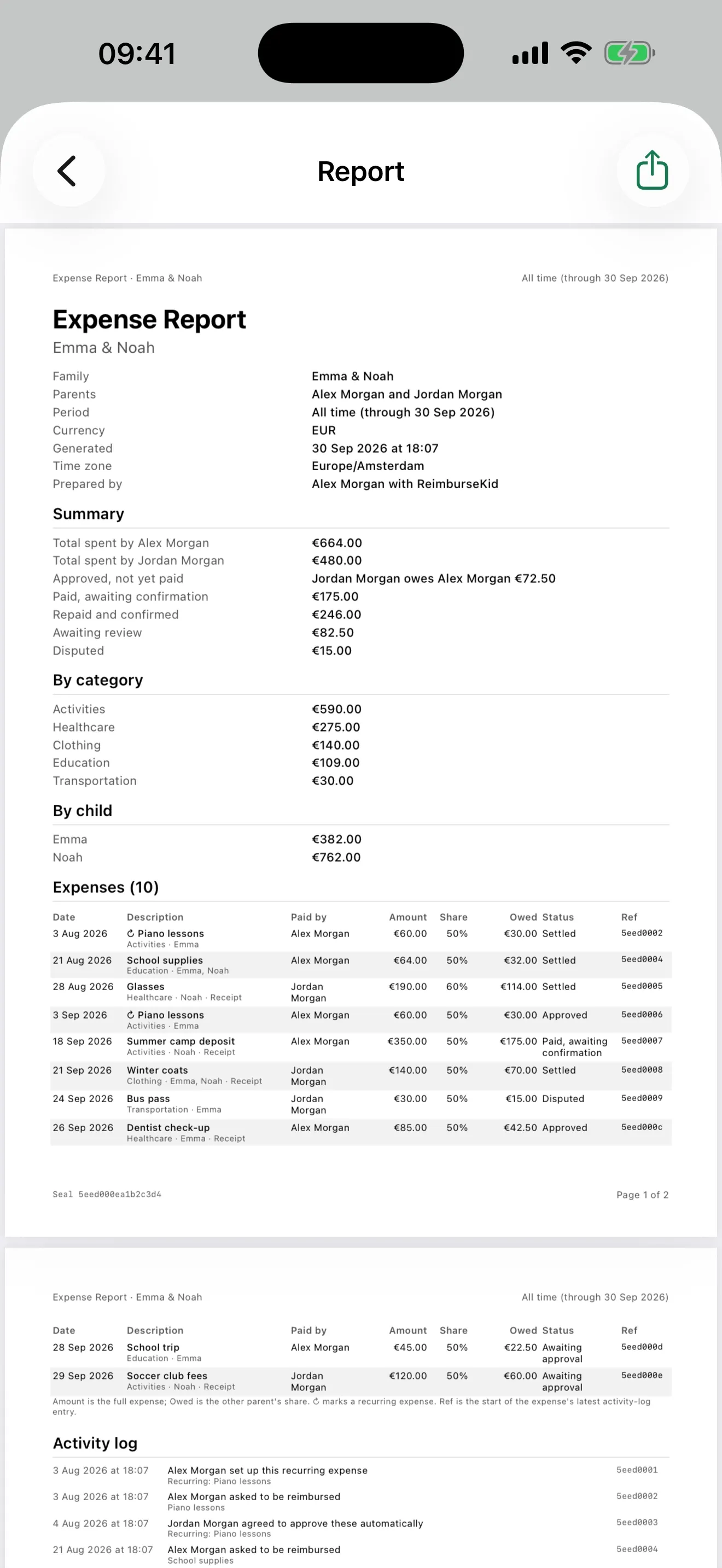
The summary, totals per category and per child, every expense with its status, the receipts, and the full activity log, for any period you choose.
The seal
Each report ends with a seal: the head of your family’s hash chain at the moment you made it. Both parents’ reports check against the same chain.
Verify a report
Type or paste a seal in Profile → Verify a report to check that it is in your family’s log, and how many entries came after it. Free for both parents.
Written for a third reader
The report is made to be read by someone who wasn’t there, such as a mediator or a lawyer: dates, amounts, who asked, who agreed, who paid. Whether a court accepts it is up to the court.
Expense ReportEmma & Noah
Activity log
Alex Morgan set up this recurring expense Piano lessons
Jordan Morgan agreed to approve these automatically Piano lessons
Alex Morgan asked to be reimbursed Dentist check-up
Jordan Morgan approved Dentist check-up
Jordan Morgan disputed Bus pass
Seal5eed000ea1b2c3d4
Who can see your family’s expenses?
Only the two parents in your family. The database checks it on every read. Receipts sit in private storage and open through links that expire after an hour. Your records are stored in the EU (Frankfurt, Germany), and ReimburseKid shows no ads and sells no data.
ReimburseKid never shows when the other parent opened the app or read something. Reminders depend only on the expense and the clock.
Two parents, never more
A family has at most 2 parents. Invite codes work once and expire after 3 days.
Payment details stay between you
Your IBAN never appears in reports or exports, and notifications show only its last four characters. The activity log keeps a masked form, like NL…4300.
Leave whenever you want
Delete your account in the app. Your login, email and payment details are removed. Shared expenses stay for the other parent, with your name replaced by “Deleted account”.
The small print, in numbers
2
parents per family, never more
1
Premium purchase covers both parents
3 days
until an invite code expires
SHA-256
hash chain behind every record
EU
where your family’s records are stored
0
read receipts or last-seen times
60 min
until a receipt link expires
12
currencies to choose from
How much does ReimburseKid cost?
ReimburseKid is free for both parents: logging, approving, balances, reminders and paying back. Premium adds PDF reports, receipt photos, recurring costs, insights and CSV export for $3.99 a month, $24.99 a year or $49.99 once, and one purchase covers both parents.
Free, for both parents
Free
For both parents. No time limit, no expense limit.
Unlimited shared expenses, tagged per child
Approve, dispute with a reason, or ask for a receipt
A balance that counts approved expenses only
Who paid: you, your co-parent, or each your own share
Pay by PayPal, Revolut, IBAN or SEPA QR code
Request payment with your details in one message
Automatic and manual reminders, gently limited
Scan a receipt to fill in amount, date and shop
Works offline; new expenses send when you’re back
Notifications at every step
Verify a report’s seal
One purchase covers both parents.
Premium, for the whole family
Premium monthly
$3.99a month
€3.99 a month in the euro area
Cancel any time in your App Store settings.
Premium yearly
$24.99a year
€29.99 a year in the euro area
About $2.08 a month. The plan the app suggests.
Premium lifetime
$49.99once
€59.99 once in the euro area
Pay once. No renewals.
PDF reports with receipts and a tamper-evident seal
Receipt photos stored with each expense
Recurring costs, set up and approved once
Insights by category and child, filters and CSV export
Same features on every plan. No per-parent fees.
Prices vary by country; the App Store shows yours before you buy.
In the euro area: €3.99 a month, €29.99 a year or €59.99 once.
Some of the best-known co-parenting apps bill each parent separately. With ReimburseKid, whichever parent buys Premium unlocks it for both.
How does it compare with a group chat or a spreadsheet?
A chat keeps the receipts but not the agreement. A spreadsheet keeps the numbers, but one parent edits it and the other has to trust it. ReimburseKid keeps both: each expense, who agreed to it and when it was paid, seen by both parents and sealed in one record.
What each option keeps track of, for two parents sharing children’s costs.
No. ReimburseKid is free for both parents, with no time limit and no cap on expenses. If either of you buys Premium, it unlocks for the whole family, so the other parent never has to buy it too.
Is ReimburseKid free?
Yes. Logging expenses, approving or disputing them, balances, reminders and paying back are free for both parents. Premium adds PDF reports, receipt photos, recurring costs, insights and CSV export for $3.99 a month, $24.99 a year or $49.99 once (€3.99, €29.99 or €59.99 in the euro area).
Does ReimburseKid move money?
No. It opens PayPal or Revolut with the amount ready, or gives you the IBAN, amount and reference to paste into your banking app, or a QR code to scan. You pay in your own app, mark it paid in ReimburseKid, and your co-parent confirms it arrived.
What happens if we disagree about an expense?
The other parent taps Dispute and writes why. A disputed expense doesn’t count toward the balance and never gets reminders. The parent who logged it can edit and resubmit it, or withdraw it, and every step stays in the activity log.
Can I use the report for mediation or court?
You can hand the PDF to anyone. It lists every expense with its status and receipts, and the full activity log, sealed with a SHA-256 hash that either parent can verify in the app. ReimburseKid doesn’t give legal advice, and whether a court accepts a report is up to the court.
Can my co-parent see when I’m online or have read something?
No. ReimburseKid has no read receipts, no “last seen” and no online status. Reminders are sent based only on an expense’s status and how long it has waited, never on whether someone opened the app.
Who can see our expenses and receipts?
Only the two parents in your family. Receipts are kept in private storage and open through links that expire. Your records are stored in the EU, ReimburseKid shows no ads, and it doesn’t sell or share your data with anyone for their own use.
How do reminders work?
When an expense waits on the other parent, ReimburseKid reminds them after 3, 7 and 14 days, at most three times, in one daytime notification per day. You can also send a reminder yourself, a limited number of times. Disputed expenses are never reminded.
Which currencies does it support?
Each family picks one currency when it starts: USD, EUR, GBP, CAD, AUD, NZD, CHF, SEK, NOK, DKK, JPY, MXN. The bank QR code works for euros only; PayPal, Revolut and copying bank details work with any of them.
Is ReimburseKid available in Dutch?
Yes. The app and its notifications follow your iPhone’s language, in English or Dutch, and you choose the language of each PDF report. Parents can each use their own language in the same family.
Does it work on Android?
Not yet. ReimburseKid is an iPhone app for now and needs iOS 17 or later, so both parents need an iPhone to use it.
Start with the next receipt.
Create your family, share the invite code, and log the next shared cost. It’s free for both of you.

 The co-parenting expense app for iPhone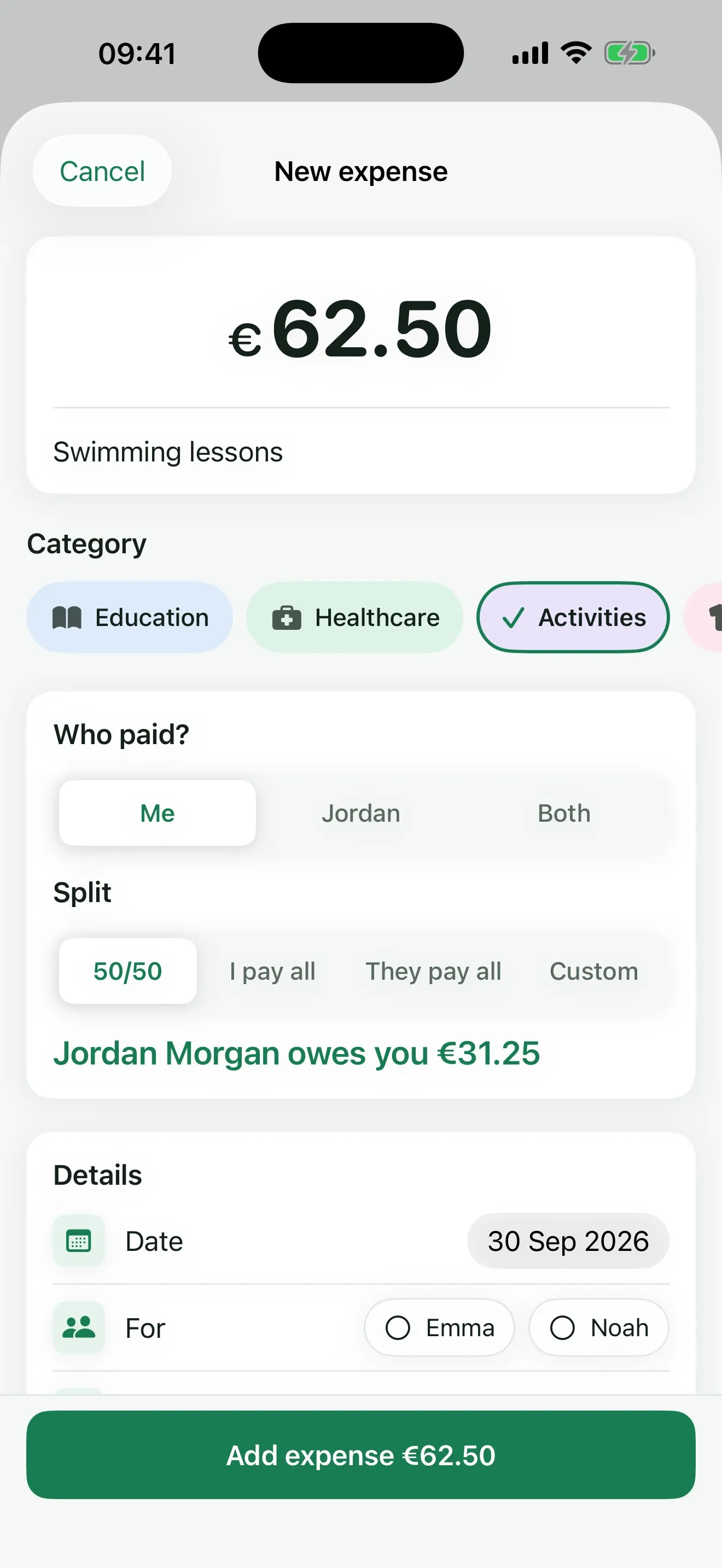
 ReimburseKid